Tag: Data Sources

  • Multi-Fact Dimension Switching

    Multi-Fact Dimension Switching

    My session at DataFam Europe included a section about some limitations of Tableau’s multi-fact model, especially regarding stuff you can do in an “old” model but not with multiple fact (base) tables.

    A recent bout of troubleshooting with a customer unearthed some new revelations, and a partial solution, for the “Dimension switching” problem that I had demonstrated.

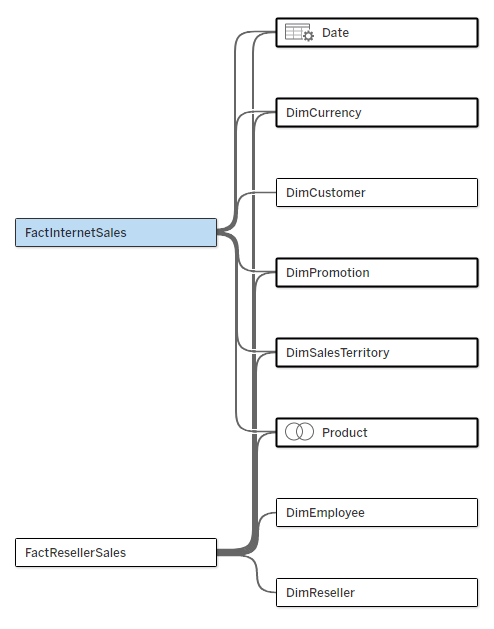
    Let’s start with the problem. I have a multi-fact data source, as below. The two fact tables have five common dimensions (Date, Currency, Promotion, Sales Territory, and Product), Customer is related only to Internet Sales, and Employee and Reseller only to Reseller Sales.
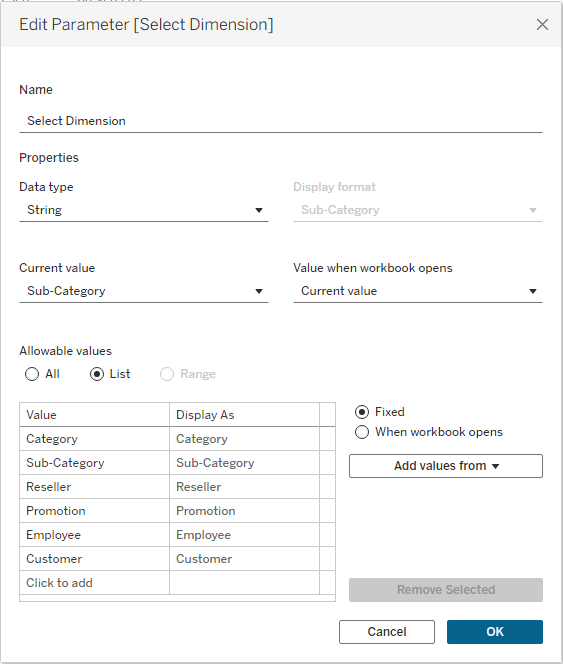
    I‘ll start by creating a parameter that will enable me to switch dimensions in my worksheet:
    Now I create a calculated field based on this parameter, which can be placed in my chart or table, and I get an error:
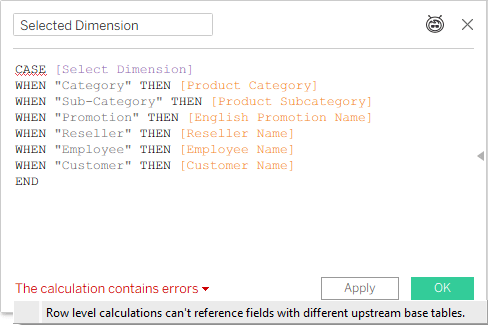
    Not good. In an old model, with just one base table, you can switch any field using this technique. Now, even if I’m only intending to use this “Selected Dimension” field with a measure from one base table (and I haven’t placed it in the worksheet yet), Tableau is already giving me an error.

    This is where the customer’s story comes in. One of the developers tried this, and received an error as expected, but another developer, working with a different data source (also multi-fact), managed to create a similar calculated field and use it in a worksheet. So we started investigating, and after some trial and error we now understand when the technique works, and, more importantly, why.

    I already know (from a conversation with Thomas Nhan, the Product Manager) that Tableau calculations in multi-fact data sources start from the base table. We’ll keep this in mind during the following examples.

    Step 1

    We start by referencing only a couple of shared dimensions from different tables (note that Category and Sub-Category are from the same table):
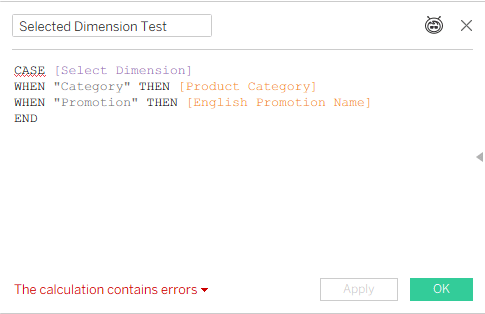
    That’s an error, because Tableau can’t decide from which base table to start calculating.

    Step 2

    We add a dimension that’s related only to one base table:
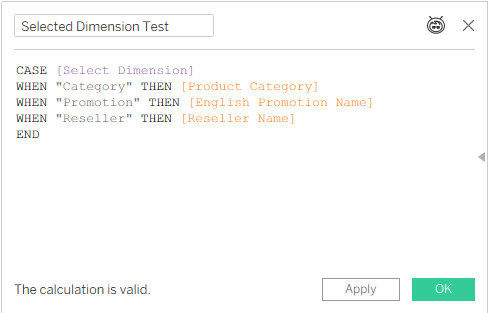
    No error, because Tableau can decide, based on the [Reseller Name] field, that it has to use the FactResellerSales base table.

    That’s the key: give Tableau a clue regarding which base table to use, and it will use it. Let’s try something else:

    Step 3
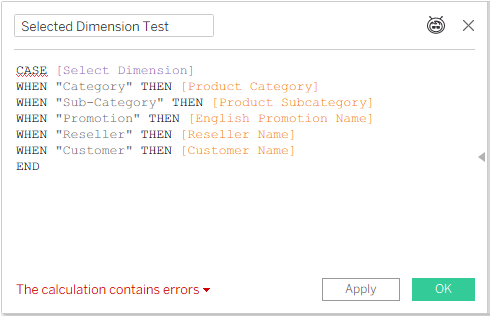
    That’s not working, because [Reseller Name] and [Customer Name] are related to different base tables. And it reminds us that dimension switching will only work with measures from a single base table, which we’ll see in the final result.

    But even if all the dimensions you need are related to multiple base tables – add a dummy field from the table that you’re referring to, just as a pointer:

    Step 4
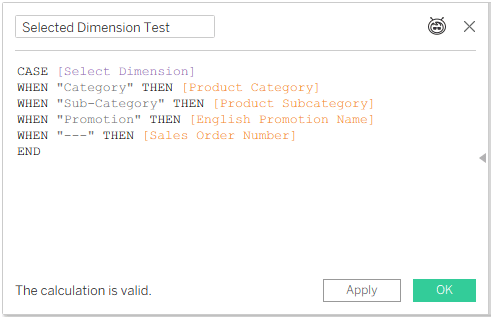
    This is OK. Category, Sub-Category, and Promotion are all related to both Internet Sales and Reseller Sales, but Sales Order Number, which will never be used because “—” is not a value in the parameter list, is in the Internet Sales fact table, so it is telling Tableau to start calculating from that base table.

    And this is where you have to look out for the actual results. By pointing Tableau at a specific base table, we are limiting the use of the dimension to that table only – even though the selected dimensions are related to two or more tables:
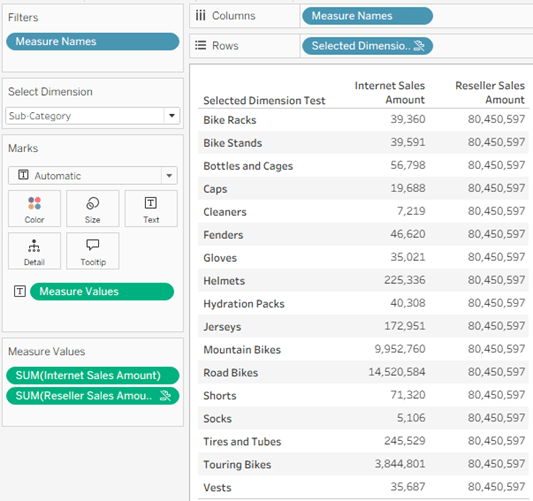
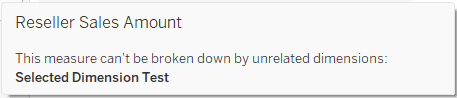
    In the screenshot I have selected the Sub-Category dimension, but in the data pane it is applying to Internet Sales Amount only, even though it is related to Reseller Sales as well – because I “pointed” Tableau at Internet Sales with my dummy row in the calculated field. Note that Reseller Sales Amount even has the icon indicating a broken link, and hovering over it displays a message:
    Conclusion

    Dimension switching in a multi-fact model works, just as it does in the old relationship model with one base table, as long as Tableau is told explicitly which base table to use. However, there is currently no improvement in the capabilities, so you can’t switch dimensions in a single worksheet and display measures from multiple fact tables. Maybe that will come in a future iteration. And now you know how to “force” Tableau to choose a base table for the dimensions when necessary.
  • Don’t Extract an Extract

    Don’t Extract an Extract

    Recently, not for the first time, I was contacted by a Tableau customer: “We have a published data source, but after we refreshed the extract, the data in the dashbords isn’t updating!”. Why? Caching? A wrong connection? No – they had extracted the extract. As I’ve seen this mistake quite often, I’ll elaborate a bit.

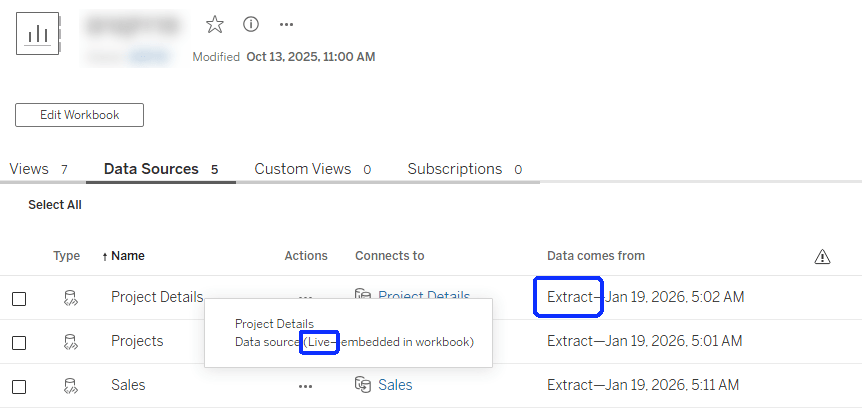
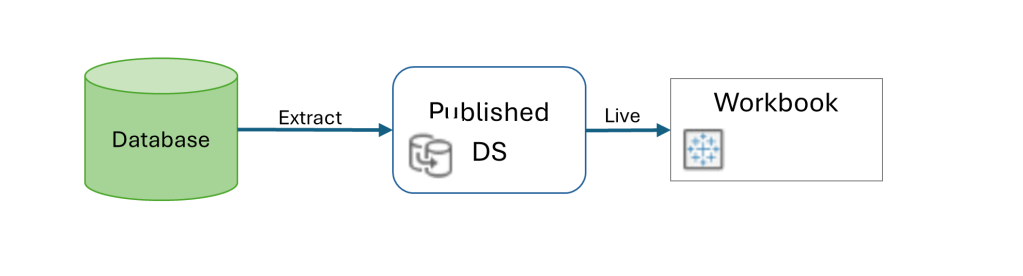
    When you’re using a published data source (on Tableau Server or Cloud), the mode – live or extract – is defined in the data source. Afterwards, when connecting to the DS from a workbook, the connection has to be live, because you’re querying the DS directly in both cases. If it’s live, the queries to the database are sent through the DS definition, and if it’s an extract the data is queried from the extract on the server.

    The mistake is in thinking that because the data is extracted, the DS has to be defined as an extract within the workbook as well. That will actually create another extract, at the workbook level, that simply pulls all the data from the published DS and saves it within the workbook. And then, if you refresh the original DS data, the workbook is still using its own extract (which hasn’t been refreshed), and the dashboard data isn’t updated.

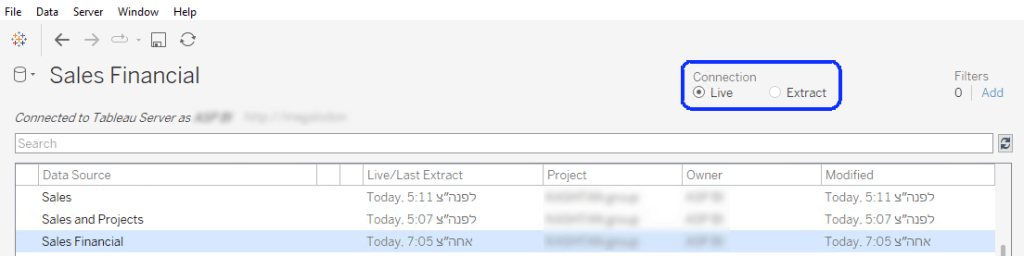
    So this is the correct configuration:

    In Tableau Desktop:

    And on the server it should look like this:

    And next time you encounter a workbook that’s “stuck” with outdated data, just make sure that you haven’t extracted the extract by mistake!

  • Published Data Sources and Calculated Fields

    Have you ever tried to edit a calculated field in Tableau, and seen only the “Edit copy” option? This appears when you’re connected to a published data source, and the field was published together with the data source – so it can only be edited through there.

    So should we publish calculated fields within the data source? What are the advantages and disadvantages? And how do we “move” a calculated field to our workbook when necessary?

    Note that I’ll use the abbreviation “DS” for “data source”, as it appears quite a lot in the text.

    I’ll start with the disadvantages:

    • As already noted, you can’t edit a calculated field that’s published in the data source. In my opinion this is a major issue – from my experience in both development and consulting with Tableau, the process includes a lot of iteration and trial and error, and the “Edit copy” barrier is a real nuisance.
    • Similarly, “Replace references” won’t work either. I’ve encountered several situations in which someone replaced a field, and was surprised that the results didn’t change. On checking, we found that the referencing fields were in the published DS, so they couldn’t be affected.
    • Performance.
      This is a tricky one. But we once analyzed performance on a data source with a lot (I think ~100) of published fields, before and after moving them to the workbook, and there was a significant improvement when the fields were with the dashboard – not in query execution but in compilation time, which can take several seconds. I don’t know the exact reason for this, but the results are consistent: you can save 20-30% of compilation time when the calculations are not in the DS.

    Advantages:

    • If a calculated field is in the data source, you can re-use it in different workbooks. It also prevents different developers from modifying “standard” calculations.
    • Materialization – pre-calculation of some fields in extracts – may improve performance slightly, but is relevant only for very simple calculations.

    Recommendations

    Note that these are my personal recommendations, and other opinions may be available.

    • In general, avoid embedding calculated fields in published data sources.
    • Notable exceptions:
      • Basic row-level calculations, such as:
        • [Price] * [Quantity]
        • [First Name] + “ “ + [Last Name]
        • DATEDIFF(“day”, [Start Date], [End Date])
        • IFNULL([any field], “N/A”)
      • Standardized business logic calculations, that you are confident will not change over time, such as:
        • Profit ratio:  SUM([Profit]) / SUM([Sales])
      • Groups, when they are used to clean up or organize a dimension.
      • Remember that there is no such thing as “pre-calculation” in Tableau beyond row level, so any fields using aggregations, level of detail functions, parameters, and of course table calculations, give you no benefit when published in the DS.

      So what happens in real life?

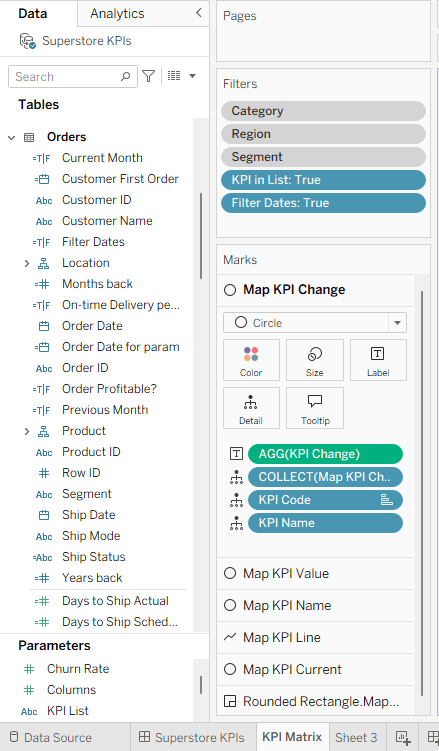
      In many cases, we create a data source and perform lots of testing or iterations, or even develop dashboards in the same workbook. But then we need to split the data source and publish it separately, while leaving the calculated fields with the dashboards. Here is a tested and proven process for doing this:

      Our starting point is a workbook with a local data source (extract), any number of calculated fields, and some dashboards (my example has just one).


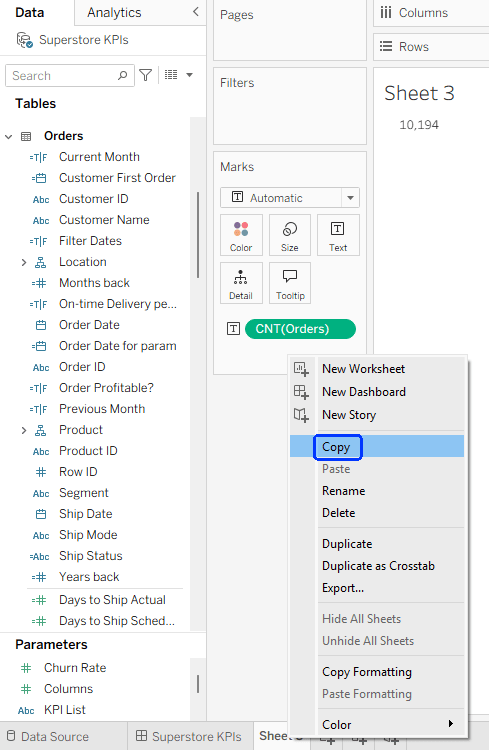
        Step 1 – Copy the data source to a new workbook:

        • Create a new worksheet.
        • Drag any field from the data source to the worksheet.
        • Right-click on the worksheet tab → Copy
        • File → New from the top menu.
        • In the new workbook: right-click on “Sheet1” and Paste.

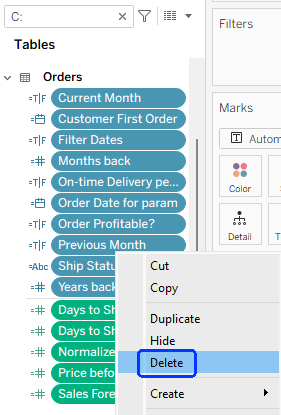
        Step 2 -Remove all calculations from the data source in the new workbook:

        • Click the filter icon at the top of the data pane, and select Calculation.
        • Select all of the fields now in the list (or batches of several each time, if there are too many), right-click and Delete. If any warning messages appear, you can ignore them.
        • Note that if you wish to retain any calculated fields in the data source, then they shouldn’t be deleted at this stage.
        • Delete any parameters or sets as well.

        Step 3 – Publish the data source (you may have to sign in to the server first)

        I always save the workbook in which I developed a data source, so I can easily make modifications and republish when needed. Therefore, I recommend not to check the “Update workbook to use the published data source” checkbox when publishing, and to save this workbook under a suitable name (“xxx DS.twb”) when finished.

        Step 4 – Connect to the published data source

        • Return to your original workbook.
        • Data → New data source → Tableau Server
        • Select the newly published DS.

        Now your original DS, with all the calculated fields, and the published DS, should appear together in the Data pane. One has the local extract icon (), and the other has the published DS icon.() Note that the published DS has no (or very few) calculated fields, compared to the local DS.


        Step 5 – Replace the data source

        • Right-click on the local DS, “Replace Data Source”, and make sure the local and published data sources are selected in the dialog box.
        • Click OK
        • You should see that all the calculated fields from the local DS are added to the published DS.
        • Close the local DS, and rename the published DS if necessary.

        Now you have a development workbook that is connected to a published DS, but with local calculated fields – that you can edit freely. You can verify that only the fields that you retained when publishing are “locked” for editing.


        Summary

        Published data sources are standard best practice, and you need to decide where to place your calculated fields, but it’s useful to know that there’s a relatively straightforward solution for moving those calculated fields from the data source to the workbook, at any stage of the development cycle.

        As a bonus, while writing this post I thought of a tiny new feature idea for Tableau: find a way to mark calculated fields from a published DS as “locked”, so the developer can identify them in the data pane. Please add some upvotes, and maybe we’ll see it implemented at some point in the future:

        https://ideas.salesforce.com/s/idea/a0BHp000016LlntMAC/differentiate-between-locked-and-editable-calculated-fields

      • Tableau Cloud 💔Static Files

        A nice feature of Tableau (Server) is that you can create data sources with multiple connections, including to files – for example a few database tables, joined/related to a static Excel file (because there’s a small set of data that’s not in your DB), or maybe to a shapefile.
        Then you can publish the data source, check the “Include External Files” box, and when refreshing your extract (or connecting live), the file is simply there. Static.


        Database tables with a relationship to Excel

        The Publish Data Source dialog box

        But what happens when you publish the same data source to Tableau Cloud?

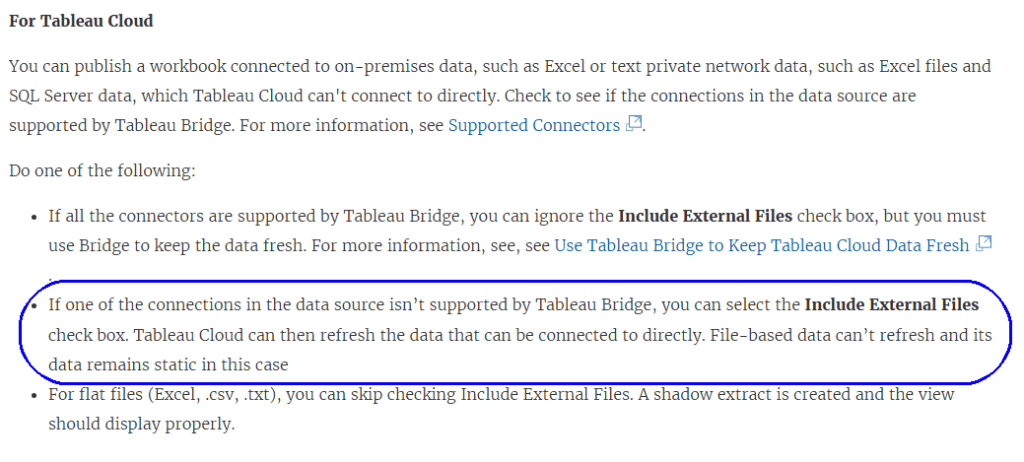
        It turns out that this doesn’t work. The documentation states very clearly that it should work:

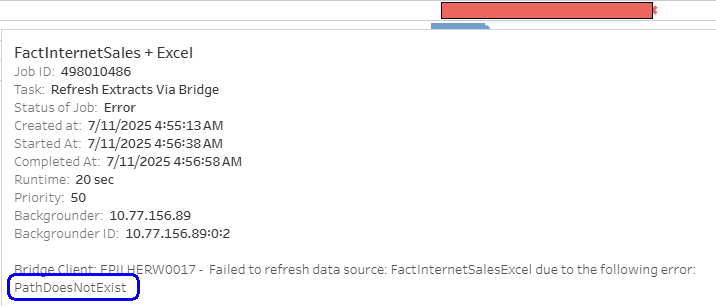
        But after testing thoroughly, and opening a case with Tableau Support, I can confirm that this causes an error on Tableau Cloud.
        If you publish a refreshable/live data source with a static file included, even after checking “Include External Files”, any attempt to connect or refresh extracts returns an error, as Tableau Cloud tries to access the file(s).

        This happens both with direct database connections and with Tableau Bridge. Now, obviously, from a technical point of view you can use a Bridge connection to connect to the file on a UNC path, but probably that’s exactly what the developer of the data source was trying to avoid.

        Why is this an issue?

        One of my customers is migrating from Tableau Server to Cloud, and has dozens of data sources that include static files. They discovered the problem only after trying to refresh the extracts on Cloud. All of them now have to be modified – mostly by loading the file into a database table.

        This issue is a major difference in functionality between Server and Cloud, but it is undocumented and doesn’t appear in any migration guides. So it’s important for the community (that’s you – my readers) to know about it, and take it into account for future migrations, at least until the documentation is corrected.

      • Filtering Multiple Data Sources

        Filtering Multiple Data Sources

        This is a revised copy of my original post in the Tableau Community blogs from 2024.

        Back in the day (before 2020.2), you could add worksheets from different data sources to a dashboard, define a filter from one of them, “Apply to selected sheets”, and it would automatically filter the other sheets using blending.

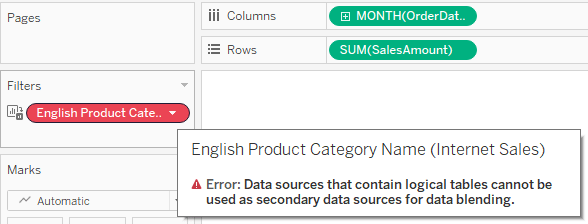
        Then came relationships, which enabled us to create more flexible and efficient data sources. However, the filtering option was suddenly lost, because the secondary data source in a blend cannot include a relationship. When you try to apply a filter from one worksheet to another, and both are based on relationships, the second is suddenly disabled (grayed out or empty), and when diving into it you see the dreaded message:

        So we started creating workarounds – and especially using parameters as filters, with all their disadvantages: no “All” option, no multi-select, no “relevant values”. And telling customers (or users) that on dashboards using multiple “advanced” data sources their filtering options were limited.

        And then, after almost 4 years of dithering around this, I had an epiphany. Looking around a bit (using mostly Google Search, of course) I couldn’t find anyone who had implemented this sort of solution, or at least written about it.

        So here are the sample workbook:

        and the explanation:

        The data is based on the Microsoft AdventureWorksDW database. There are two data sources with relationships to various dimensions: Internet Sales and Reseller Sales. Both have similar data and some common dimensions.

        Basically the idea is to create a supporting data source for each dimension used as a filter, with no relationships. Joins are possible, of course – if you want to create a hierarchy, for example.

        In this case we have three supporting data sources:

        ·        Sales Territory (including a hierarchy of Group, Country, Region)

        ·        Product Category (including Category and Sub-Category)

        ·        Dates – this actually contains all dates within the relevant data range, and is based on a separate view from the actual data. I named the date field “Order Date” because this is the field’s name in the main data sources.

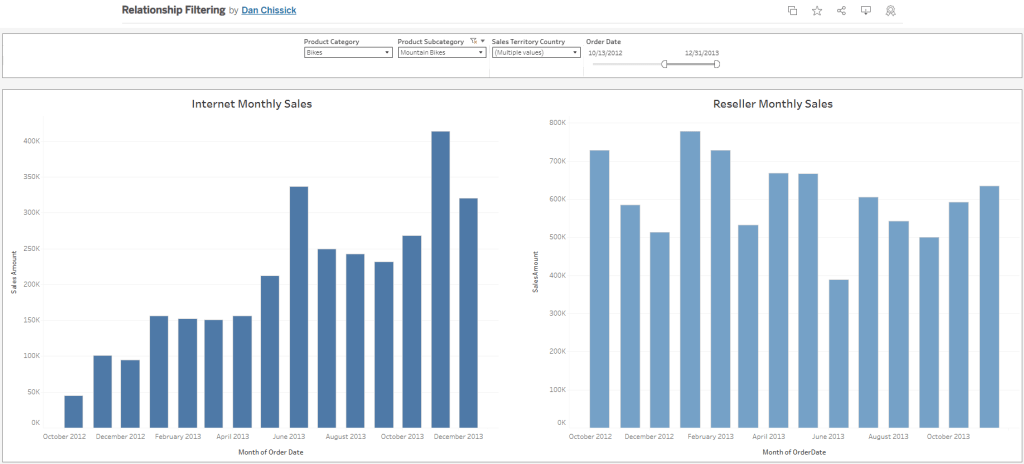
        Now create a dashboard and add worksheets from the two main data sources. I’ve added two bar charts.

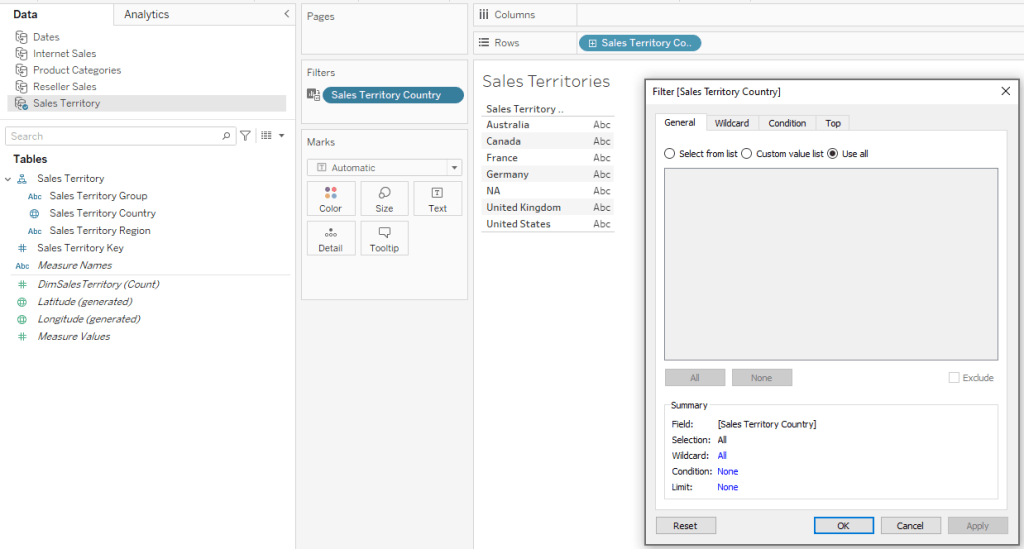
        For the Sales Territory Country filter (for example), create a worksheet with only Sales Territory Country on the rows. Add the same field as a filter as well (select “Use all” for now).

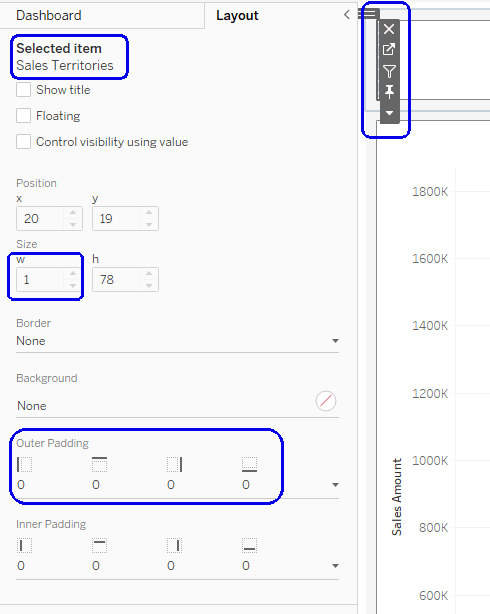
        Go to your dashboard, and drag the worksheet onto it. Then make it disappear: set “Outer padding” in the layout to zero, and the height and/or width in pixels to 1.

        In the worksheet menu select Filters –> Sales Territory Country, and the filter will appear. Place it wherever you want, Apply to Worksheets –> Selected Worksheets, and select the worksheets with the data.

        And there it is – the filter affects both bar charts, using the Sales Territory data source, which has no relationships, as the secondary data source for the filter.

        Using the Product Category data source and another hidden worksheet, I created a couple of additional filters for Category and Sub-Category.

        As for the dates, the process is the same, and I can use any type of date filter – relative, range of dates, year, etc. It’s important for the independent Dates data source to include all possible dates in the actual data sources, so the blending works properly.

        To summarize – the finished dashboard has charts from two different data sources with relationships and multiple logical tables, filtered by common dimensions with little effort. The supporting “dimension” data sources can be re-used, so this is a relatively simple workaround for organizations working with many complex data sources and seeking to combine them within multiple dashboards.

      • Click on “Use Extract”

        One of the infuriating behaviors I encountered early on with Tableau was when I was working with an extracted data source in Desktop. I would be creating worksheets, calculated fields, and dashboards, and then I needed to check something in the data source.

        So I went to the Data Source page, dug into the structure, found what I wanted – but I didn’t change anything. However, when I wanted to return to my worksheet, Tableau decided that something had changed, and started the dreaded extract refresh…

        What do you do in this situation? Wait 10 minutes for it to finish? Cancel and remain stuck in Live mode?

        There’s a solution:

        Cancel.

        If the worksheet starts processing in live mode, Cancel again.

        Now go to the data source’s right-click menu, and check the “Use Extract” option. Your extract still exists, so you are returned instantaneously to extract mode as if nothing has happened. Problem solved.

        I’ve seen this happen literally hundreds of times, especially while working with others, and most developers think they have no option except wait for the extract to finish. So I hope this small tip helps someone…