Tag: Formatting

  • Tableau Text Wrapping

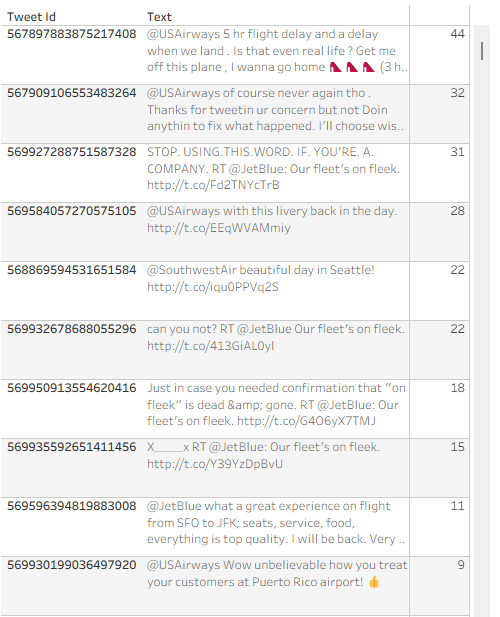
    Recently someone noted that Tableau tables don’t do a great job displaying long text fields – the row height can be adjusted to accommodate any number of lines of text when it is wrapped, but it is fixed for the whole table, not dynamic per row. Look at the example below (just some old tweet dataset that was lying around), and you can see that all rows have exactly 3 lines, so in many cases there is blank space, or an overflow (two dots at the end):
    Is there a solution? Built-in there isn’t, but a couple of calculations can certainly help and format our text table more efficiently. This is how it’s done.

    First, I define an integer parameter called “Text length” and set the value to 40. I’ll use it later.
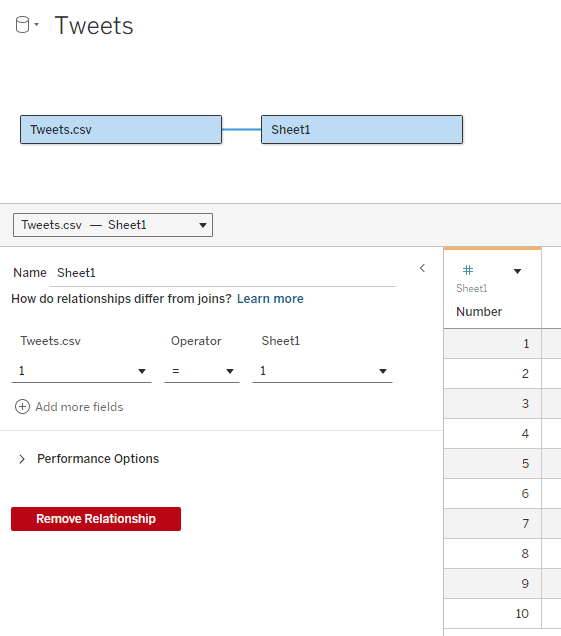
    Now I need to add an “expander table” to my data source. This is a simple table (I usually use Excel) with a column of numbers, from 1 to as many as needed. In the example I don’t expect to display more than 10 lines of text, so I limit the table to 10, but it can be a lot more. The relationship between the table and my data table is set as a full cross-join: 1 = 1
    What I’m going to do now is split the text field into separate lines, by finding the first space after every N characters (N being my parameter) and cutting the text at that point. For this I use 3 calculated fields:

    Cutoff N (this marks the first space after N * Number characters (or the end of the text)

    IF FIND([Text], ” “, [Number] * [Text length]) = 0 THEN LEN([Text])+1
    ELSE FIND([Text], ” “, [Number] * [Text length])
    END

    Cutoff N-1 (this is the previous space)

    FIND([Text], ” “, ([Number] – 1) * [Text length])

    Text N (cut out the text from [Cutoff N-1] to [Cutoff N]

    IF [Number] = 1 THEN LEFT([Text], [Cutoff N])
    ELSE TRIM(MID([Text], [Cutoff N-1], [Cutoff N] – [Cutoff N-1]))
    END

    Note that I’m using the [Number] field from my expander table to define the line number (N), and the number of characters in each line of text depends on the [Text length] parameter.

    Place [Number] on rows, then [Text N], and I get my table with the text field split nicely into lines:
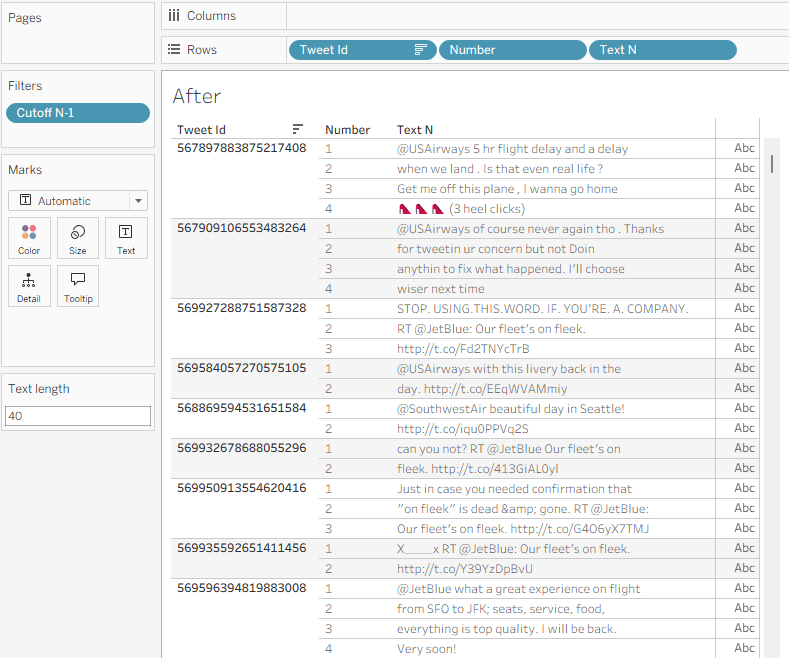
    I can use the Text length parameter to play with the field width, and see what it looks like with different values.

    A few additional formatting steps:

    • Uncheck “Show Header” on the Number field in Rows.
    • Format the Borders so the lines within the text disappear.
    • Fine-tune the row shading.
    • If there’s no field after Text N, switch the mark type to Polygon so the “abc” disappears.

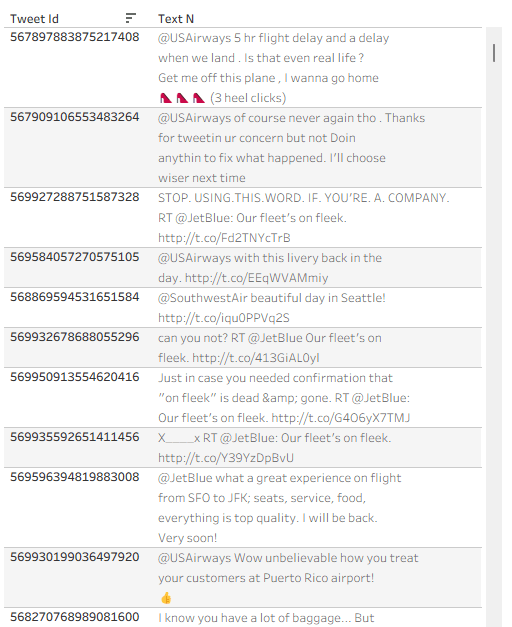
    And I have a formatted text table:
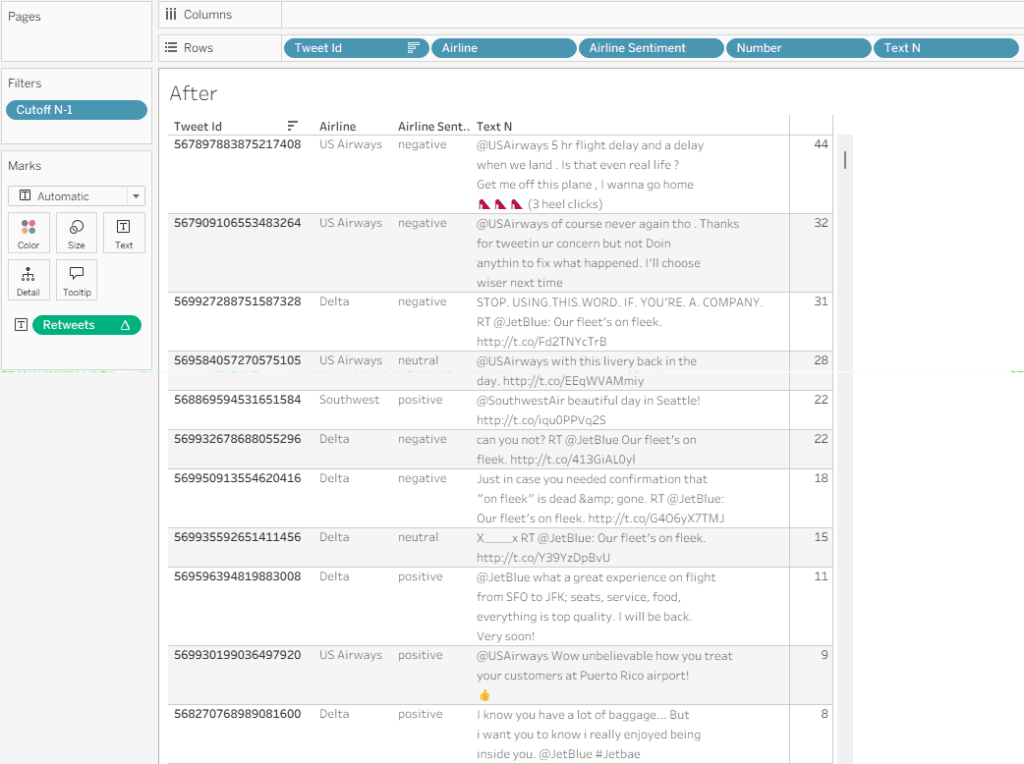
    Now let’s say that I need some data field to the right of my text – in this example I’ll use “Retweet count”. If I just add the field, it will display the same value for each line of text, so I need to use a table calculation:

    Retweets

    IF FIRST() = 0 THEN SUM([Retweet Count]) END

    I can add this, and then Edit Table Calculation using the following settings:
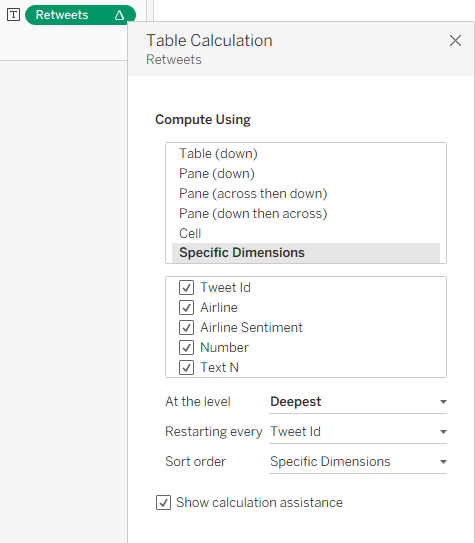
    This enables me to show the value only for one row, and my finished table, with the additional columns, looks like this:
    Summary

    The data in this sample dataset isn’t varied, with most tweets being around the same length, but you can see how a flexible number of text lines per data row can improve the look and feel of a Tableau table. So it’s not impossible – you need just a relatively simpke workaround. And that’s part of the power of Tableau: with a little imagination and some calculated fields, you can tweak your visualizations and solve many display problems without any coding.
  • Measure Value Indicators

    Measure Value Indicators

    As usual, this post started from a customer request. They had a nice table set up in Tableau, with Measure Names and Values (quite complicated ones), and they wanted to add a column with an indicator for each row – just a colored dot, but with 4 different colors.

    At first I said it couldn’t be done without re-engineering the whole table, but then I thought about it and suggested a solution similar to the following example, which is already working nicely in production.

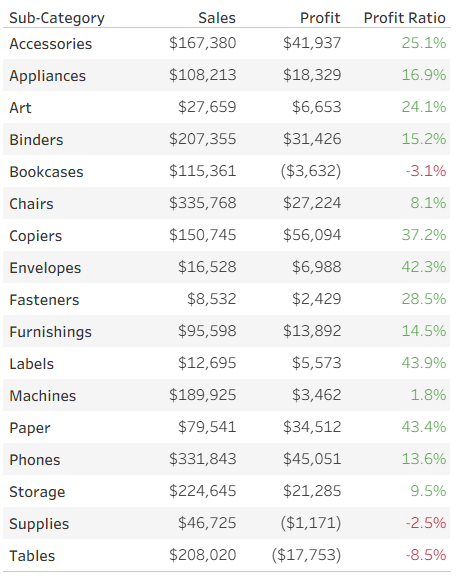
    Let’s start with a simple table of measures, already colored using Separate Color Legends:

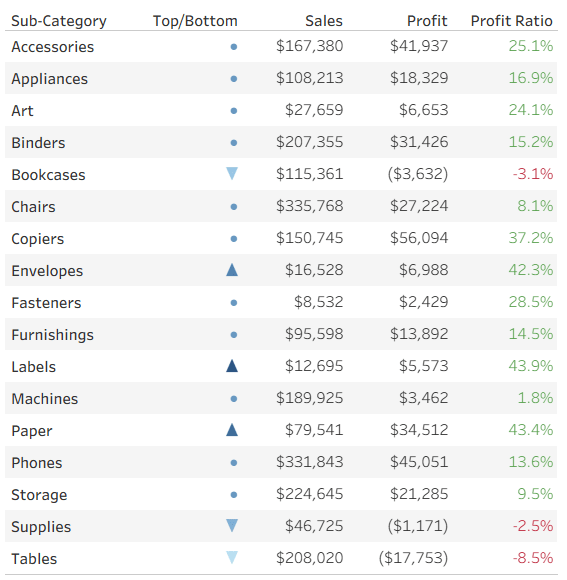
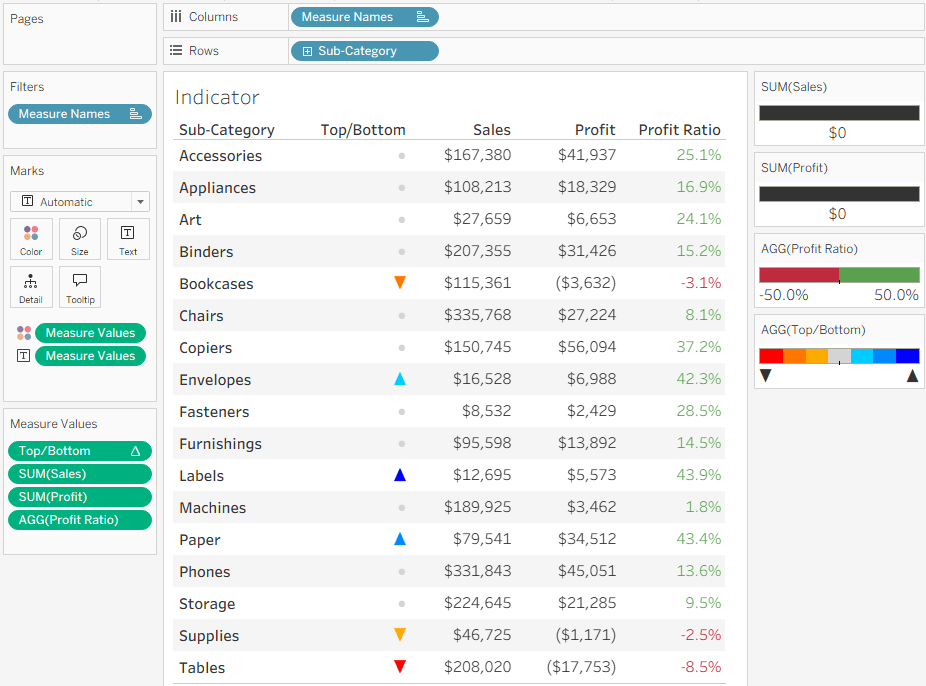
      Now we want to add a colored indicator for some of the rows, based on a calculated field – I’ll take the ranking of Profit Ratio as an example. To stretch Tableau to the limits, my requirement is to display an upward pointing triangle for the top 3 rows (Sub-Categories) in Profit Ratio, a downward pointing triangle for the bottom 3, and a circle for the rest. In addition, the top 3 should be colored in shades of blue, the bottom in red, and the others in light gray. Impossible? No!

      I start by defining my calculated field. What I need is a series of numbers, not the actual value (which is displayed separately in this case), and you’ll see later how these numbers support the visual element. I’m aiming for the numbers from 3 to -3:

      IF RANK([Profit Ratio]) <= 3 THEN 4 – RANK([Profit Ratio])
      ELSEIF RANK([Profit Ratio], “asc”) <= 3 THEN -4 + RANK([Profit Ratio], “asc”)
      ELSE 0
      END

      This gives me the values 3, 2, 1 for the top 3 rows, -3, -2, -1 for the bottom 3, and 0 for the rest.

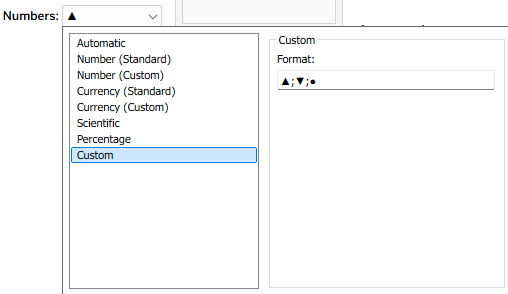
      I can now leverage two of Tableau’s formatting features to create my indicators. First, the number format – I define a custom format:  ▲;▼;●

      What does this mean? Every number format is divided into three sections, separated by semicolons. The first is for positive numbers, the second for negative numbers, and the third for zeros. I’ve told it not to display the actual value, but a single character in each section (it could be any unicode text).

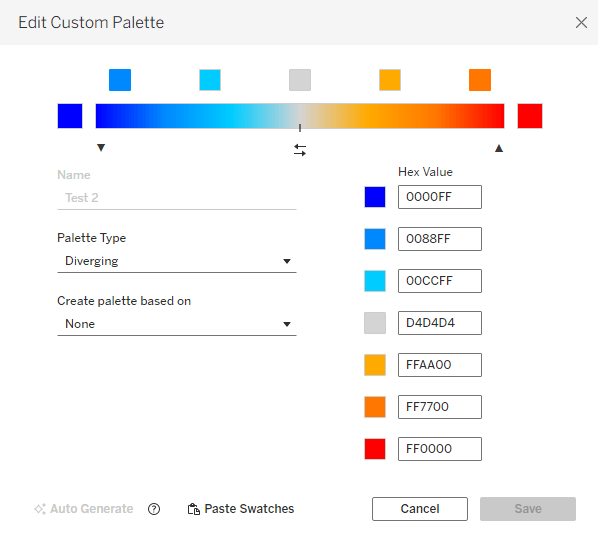
      Then, in addition, I can use Tableau’s color options and define a custom diverging color palette, with as many colors as I want. This is much easier in versions from 2025.3 onwards, that have the custom palette editor within Tableau, but can also be done by modifying the preferences file :


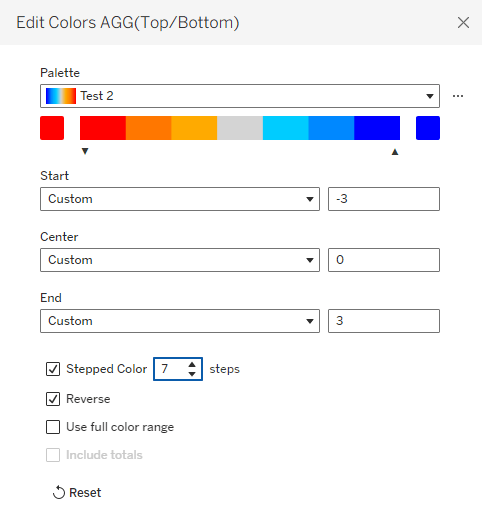
      Note that it’s important to define the same number of colors as numbers that I’m using for the indicators, and for the numbers to be evenly distributed. That enables me to fix the palette scale from the lowest to the highest number, and when I define Stepped Color with the corresponding number of steps, each number in my measure gets its own color:

      That’s it. I have my indicators in a simple Measure Names/Values table, without changing the whole structure of the worksheet.

      Remember that this technique has constraints: not more than 3 special characters or texts, and theoretically you can define any number of colors, but I haven’t checked Tableau’s limit (maybe 20?). But the bottom line is that it allows you to add colored shapes as indicators to a table of measures, as an additional column, and that can be very useful.

    • Workbook Locale

      Many times, I’ve encountered Tableau developers struggling with the date formatting in their workbooks, mostly as it defaults to the US format (mm/dd) instead of what they need – and then they waste time setting custom formats for date fields in various worksheets.

      The solution to this, and one of the lesser known features of Tableau Desktop, is the “Workbook Locale” setting, located under the “File” menu.

      The “Automatic” option defaults to your computer’s regional settings, but if you select “More” you can choose your language, and then all date and number formats in the workbook will use that setting by default.

      Even less known is the fact that this setting, at the workbook level, overrides any other regional locale. So if you save the workbook with a locale other than “Automatic”, the date and currency format is fixed, even after publishing to Tableau Server or Cloud.

      The order of precedence is listed below, and documented here:

      1. Workbook locale (set in Tableau Desktop)
      2. Tableau Server User Account language/locale settings
      3. Web browser language/locale
      4. Tableau Server Maintenance page language/locale settings
      5. Host computer’s language/locale settings

      The bottom line – you can control everything using Workbook Locale, so use it, unless you need varying formats for users in different languages or countries, of course.

    • Tooltip = Axis ?

      Tooltip = Axis ?

      Tableau has many little quirks. With time you get used to them, but for new developers some of the small stuff can be very frustrating at first, and a nudge in the right direction always helps. So here’s one of them.

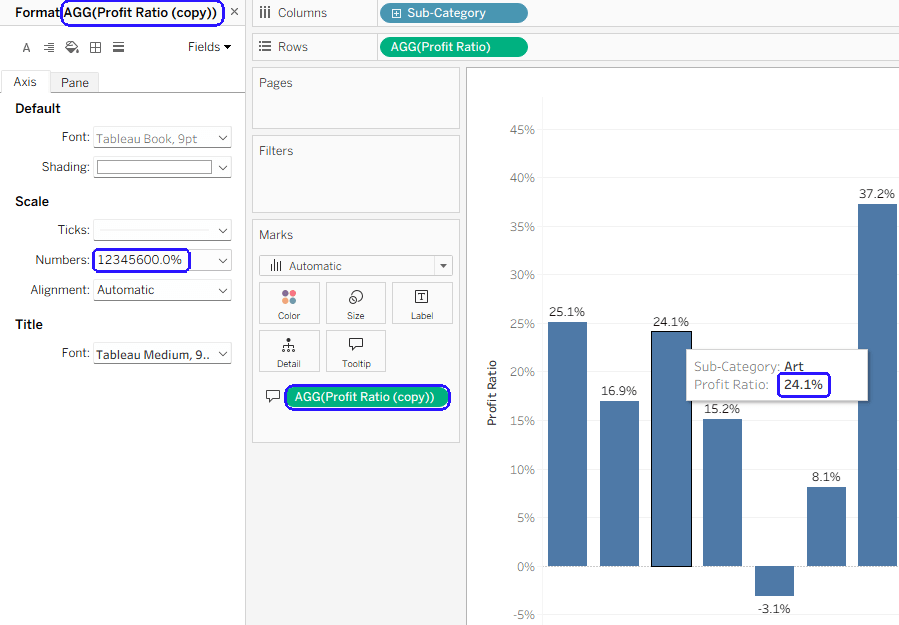
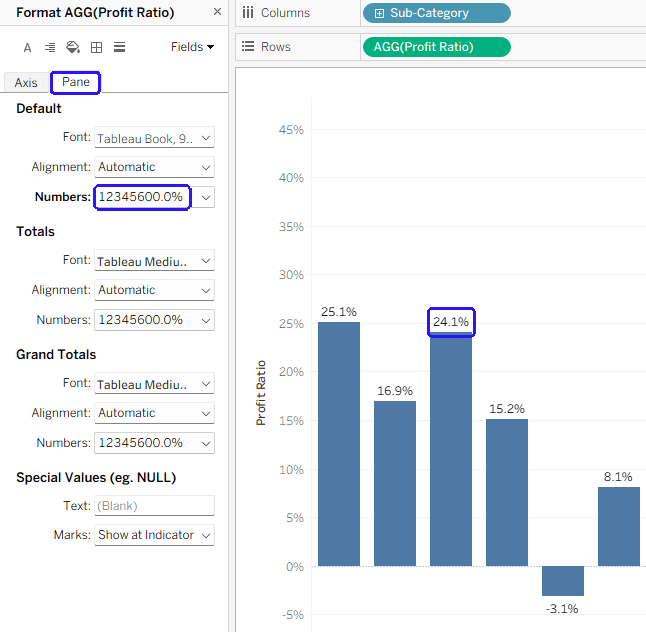
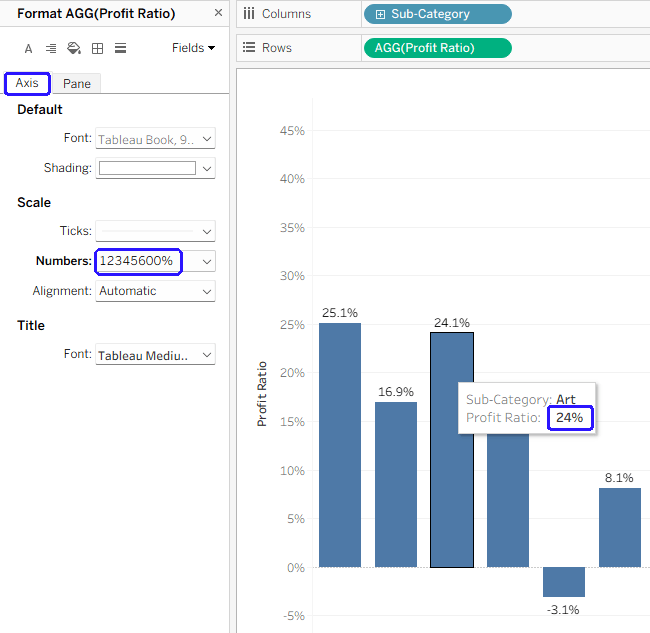
      In Tableau charts, any numbers appearing in tooltips are formatted using the “Axis” format, and not the default “Pane” format. So if you want your chart label to show “24.1%”, and the axis to have 0%, 5%, 10%, etc., your tooltip will show “24%”, which is a bit strange. See the example below:

      The best solution in such a scenario is to duplicate the relevant field, so basically you’re using two different fields – one for the label and axis, and another for the tooltip. Now you can set the axis format for the tooltip field (“Profit ratio (copy)” in the example below) without causing your axis to show unnecessary digits.

      Is there a reason for this functionality? Logic says that the tooltip format should be similar to the label, not the axis (which is usually more “rounded”), but maybe there’s something hiding behind it. And there’s been an Idea (now on the Salesforce IdeaExchange) about changing it for 12 years…