Dynamic Zone Visibility (or DZV) was introduced by Tableau back in 2022, and is a great feature. It enables you to display or hide any dashboard object, or container, based on the value of a parameter, or a calculation that uses a parameter.
What most developers I’ve worked with don’t know, however, is that hiding a worksheet using DZV does not prevent Tableau from retrieving the data for the worksheet. So, for example, if you are using a parameter to switch between 5 different displays (so 4 are hidden), the data for all of them is being calculated every time you refresh the dashboard, or change a filter value, even if only one is visible. That’s a x5 performance hit!
In order to test this thoroughly, I created a workbook with two worksheets: “All Routes”, which is quite slow, and “Bus Calendar”. I also created a parameter with two values (“Times”, “Map”) for switching between them, and the necessary calculated fields:
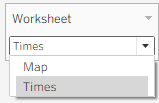
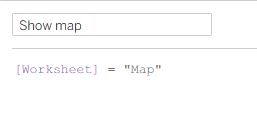
I then created three dashboards:
1. A dashboard displaying both sheets, with no DZV.
2. A dashboard switching between both the sheets, using only DZV.
3. Like no. 2, but adding a context filter on each sheet, using the same boolean field as the DZV, so the data is filtered out when the sheet is hidden.
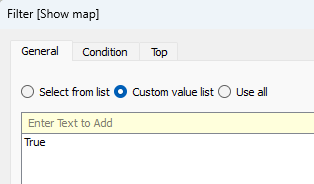

I then used a Performance Recording to see what happens under the hood. Note that Tableau uses caching, so when a worksheet’s data has already been retrieved using a specific filter, it won’t execute the query again. The results are below:
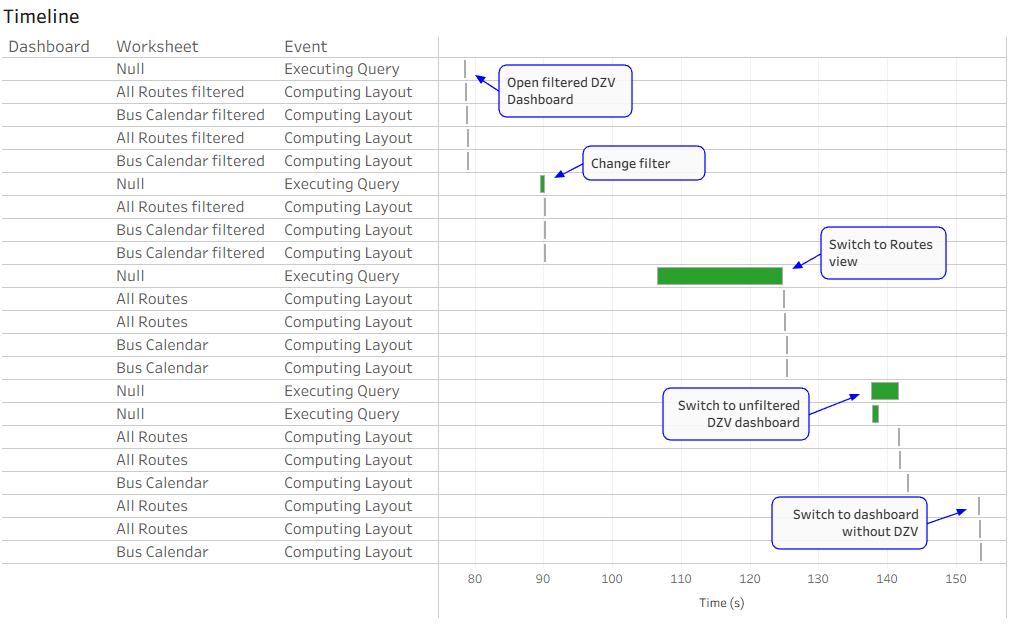
So what happened?
- I opened the filtered DZV dashboard first, with “Times” selected in my parameter. Only the “Bus Calendar” query was executed.
- I changed a filter that affects both sheets. Again, only the “Bus Calendar” query was executed.
- I switched my parameter value to “Routes”. You can see in the screenshot above that only the “All Routes” query (the long green bar) was executed.
- Now I opened the unfiltered DZV dashboard, changed the filter, and it immediately executed the queries for both worksheets, even though only “All Routes” was visible.
- Lastly, I opened the dashboard that displays no sheets. No queries were executed, because both sheets already had the data.
Obviously this is just a quick scenario. I’ve checked this much more thoroughly on both Desktop and Server, and you can easily check for yourselves using Tableau’s Performance Recording tools (more about that in a future post).
For now, I’m not telling you not to use DZV. It has great advantages over the old “hack” of filtering worksheets (which I used here), in that you can hide other objects as well, and you don’t need to hide the worksheet title in order to make it disappear. Just bear in mind that hidden worksheets are still calculated, and that affects performance, especially if you have a lot of data.
 BI Stories