This is a revised copy of my original post in the Tableau Community blogs from 2023.
Over the years I’ve encountered many examples of data that includes arrays of values within a single field – either in JSON format or as simple text, such as this: [[4,0],[5,3],[7,3],[8,0],[4,0]]
Usually the data can be un-nested using SQL or JSON functions into a set of separate rows, which can then be linked to the original data table as a separate table. However, a few years ago I was working on a system with no such option: the original data was in ElasticSearch, and our ODBC driver didn’t enable any un-nesting functions. And we needed to get the row data from the arrays.
It turns out that Tableau can do this quite easily. Here is the solution:
1. Build a regular data source from your table, with the array field as normal text. In the example, it’s called [Shape Coordinates].
2. Create a table of numbers from 1 to N, with N being larger than the maximum size (number of items) in your array. The table can be in Excel, the database, or any other format. Add the table to the data source and join it to the data table using a relationship, using a full cartesian join – meaning that you create a relationship calculation with an identical value (I use 1) on each side.
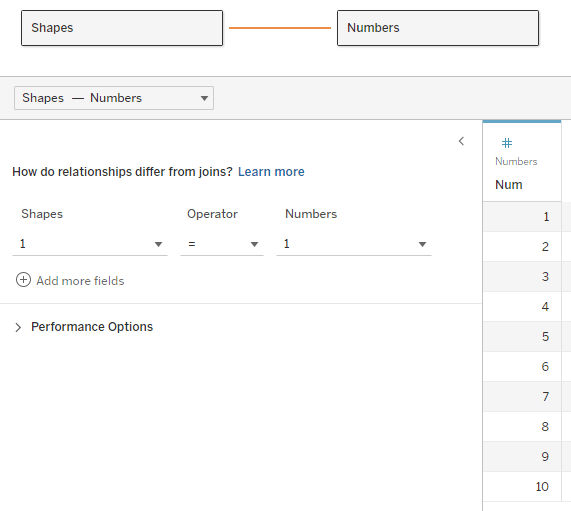
Note – the example here unnests a two-dimensional array. Each value has any number of pairs of coordinates, specifying a shape to be drawn on the page. The real data actually had pairs of real coordinates (latitude/longitude) specifying a GPS track.
Now, for every row of data we have numbers from 1 to N in the corresponding table, which we will use to find the 1st, 2nd, 3rd, and so on… members in the array, by splitting it using the commas and brackets in the string. I would have loved to use the SPLIT function here, but it doesn’t accept a field or variable as a parameter, so we’ll use FINDNTH instead:
3. We find the start of each member: Start → FINDNTH([Shape Coordinates], “],[“, [Num]-1)
Note that I’m looking for “],[“, because the comma alone is not enough – it will find the split between each pair as well.
4. The end of each member: End → FINDNTH([Shape Coordinates], “],[“, [Num])
5. The length of each member is basically End minus Start (the last member has no End, so I use a maximum value, longer than any string that I would expect:
Length → IF [Start] > 0 THEN
IF [End] > 0 THEN [End] – [Start]
ELSE 20
END
END
6. Now the actual split: Split → MID([Shape Coordinates], [Start], [Length])
7. And clean up all the brackets and commas: Pair → REPLACE(REPLACE(REPLACE([Split], “],[“, “”), “]”, “”), “[“, “”)
I’ve now unnested my array and retrieved an ordered list of values for each row of data. In this case the values are pairs of numbers, but they could be any type of data. If there are less than N members in the array, the Split and Pair fields return Null and can be filtered out. The data looks like this:

8. I split the pairs into X and Y coordinates:
X → FLOAT(SPLIT([Pair], “,”, 1))
Y → FLOAT(SPLIT([Pair], “,”, 2))
9. Now I can visualize my geometric shapes on a worksheet using polygons:

Discussion
This technique works, and caused no performance issues on a dataset that included tens of thousands of records, with each array having up to 50 pairs of latitude/longitude values.
The “normal” solution would unnest the arrays using SQL, thereby creating a new data table with a large multiple of the original number of records, though with very few fields (ID, X and Y). If you are visualizing only a small number of records at a time, I would expect much better performance from my technique, which calculates the array data on the fly and only for the specific records you need. However, if you are filtering or aggregating by array data from thousands or millions of records in one view, a pre-calculated table would probably be much faster.
The sample workbook is on Tableau Public: https://public.tableau.com/app/profile/dan.chissick/viz/UnnestingArrays/UnnestingArrays
 BI Stories
Leave a comment