I’m actually writing this post because I encountered a small bug in Tableau’s incremental refresh setup, but it’s an opportunity to make a case for the functionality in general.
At first, incremental refresh of extracts wasn’t very useful, because you could only add new data – either by a numerical or a timestamp field. It was nice if your large data table had only inserts, like log entries, but that’s not the case in most operational systems.
This changed back in 2023, and now you can refresh an extract incrementally based on a date range, so all data within that range is replaced – thus enabling updated and deleted records to be modified in the extract. The limitation is that only one logical table in the extract can be defined for incremental refresh – all the others are still fully refreshed.
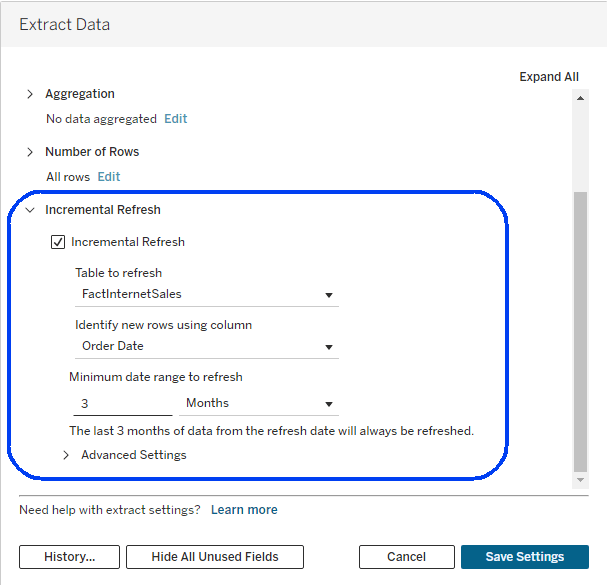
Since this upgrade, I have seen more and more customers start using incremental refresh, and therefore had to debug more problems. This latest one was a bit strange – in some data sources, you simply couldn’t check the incremental checkbox, even though they were very similar to other data sources that had no such problem. They had a similar structure, the same database connection, and no special features. So what was different?
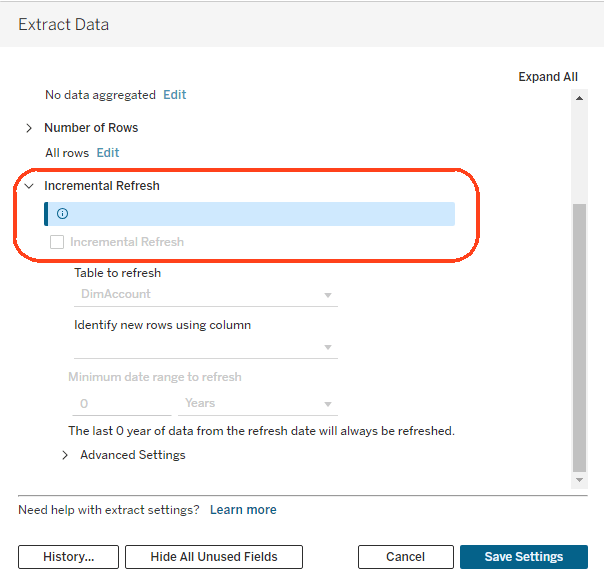
The solution was found by Vered, an analyst for one of my customers. When you first open the Incremental refresh dialog, the dropdown list of tables is sorted alphabetically, and the first table is displayed. If that table is not eligible for an incremental refresh, because it has no relevant fields, the options are disabled. In the screenshot above, the DimAccount table is the first in the list, and includes only text fields, so I’m stuck.
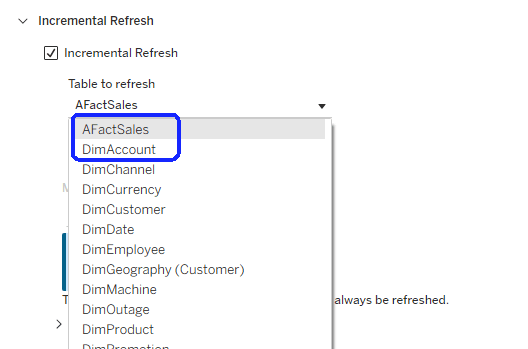
Obviously this is a bug, and I’m opening a case with Tableau Support, but there’s a very simple workaround: rename one or more of the tables so that the first in the list includes a numeric or date field. Note that special characters aren’t taken into account, and regular letters come after capital letters. In this same data source, I renamed “FactSales” to “AFact Sales”, and the problem was solved.
Incremental refresh is very useful with very large data tables, and is now becoming even more powerful, with Composable Data Sources (CDS). You can still only define one incremental table per data source, so what if it includes two or more gigantic tables? With CDS, you can split such a data source into several parts, define an incremental refresh on each, and reassemble them using CDS into a data source that is identical to the original.
Tableau 2026.2.1 was released a couple of days ago with CDS enabled, so within a few months this feature alone will encourage customers to upgrade their servers and start saving valuable resources on extracts.


Leave a Reply