Yes. And No.
One of the things I learned about Tableau at an early stage was that text comparisons are case-sensitive. If you take a packaged Superstore demo workbook, for example, and create a calculated field to check if [Sub-Category] = “art”, all rows will return a False value, even though there’s a Sub-Category called “Art”.
But that’s not always true. Case-sensitivity, which can be critical in some use cases, such a row-level security, actually depends on the data source. And even that is inconsistent.
If your data is in Excel, and you have a live connection, Tableau is case-insensitive. You can easily check: open the built-in Superstore workbook, which has a live connection to the source data in Excel, and check if [Sub-Category] = “art” returns a True value for “Art”. It does.
Now extract the data source, and the value changes to False. So the extract is case-sensitive.
If your data source is a case-insensitive database, Tableau comparisons will be case-insensitive even if you have extracted the data, because the metadata properties are stored together with the extract.
In addition, note that the properties are stored at the field level – so if a specific field is defined differently in the database, it will behave accordingly.
I ran a few tests in order to check, but I don’t have a variety of database types available to connect to, so my findings are based on a MSSQL database:
Excel – as noted earlier.
Text files (csv, Json) – all comparisons are case-sensitive.
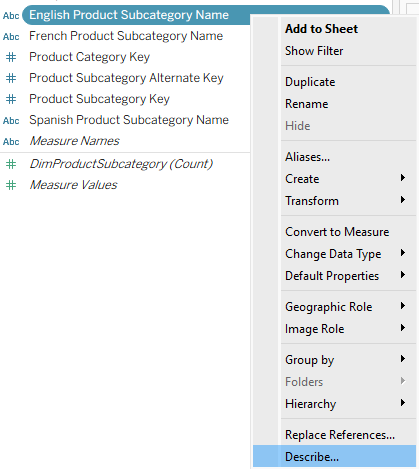
Databases – use the actual collation for each field. If in doubt, you can use the Describe menu option for the field and check, as in the screenshot below.
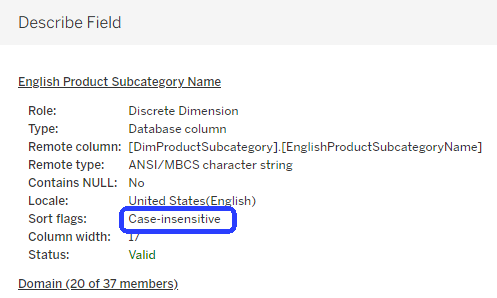
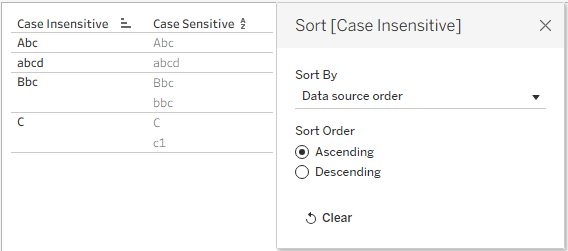
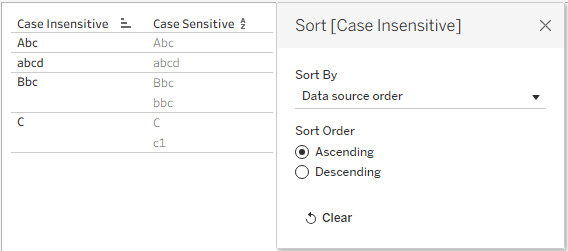
Why is it called “Sort flags”? Tableau somehow uses the collation in its sorting, which can use either Data Source order, which sends the query to the database, or Alphabetic, which sorts all capital letters before small letters irrespective of the source field.
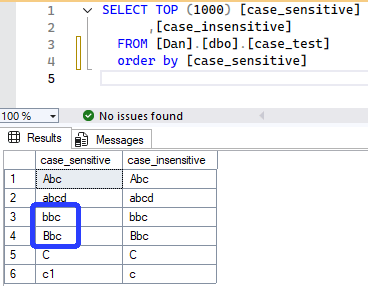
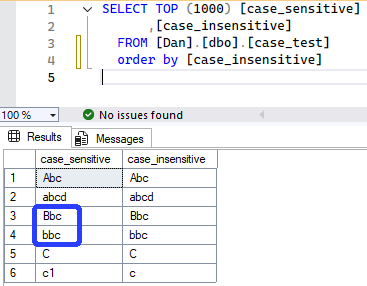
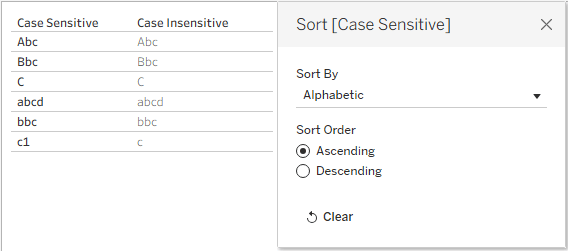
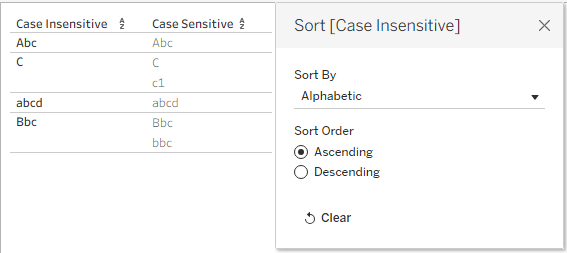
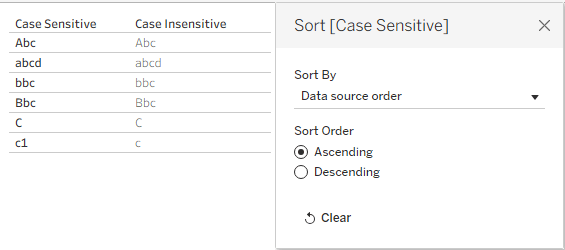
This, however, can cause a mess. First Tableau will group the text values by comparing them (case-insensitive), display the first (capital letter), and then sort by… this is where I lost it! Try to make sense of the tables below, where I created two fields (case_sensitive and case_insensitive, as their names suggest), and sorted first in the database and then in Tableau.
Original Data
Sort Alphabetically in Tableau
Sort by Data Source order in Tableau
I also tried to hack into the workbook XML, find the definition, and change it – but it didn’t work, and the codings of the various options there are difficult to understand. Leave it alone.
So what to do?
First, know what you’re using. Remember that if the data is case-sensitive, then “A” does not equal “a”, and if you need your comparisons to identify them as equal, use UPPER or LOWER on both sides. And keep in mind that it could affect the sort order as well.


Leave a Reply